Codex app: the Cursor Killer
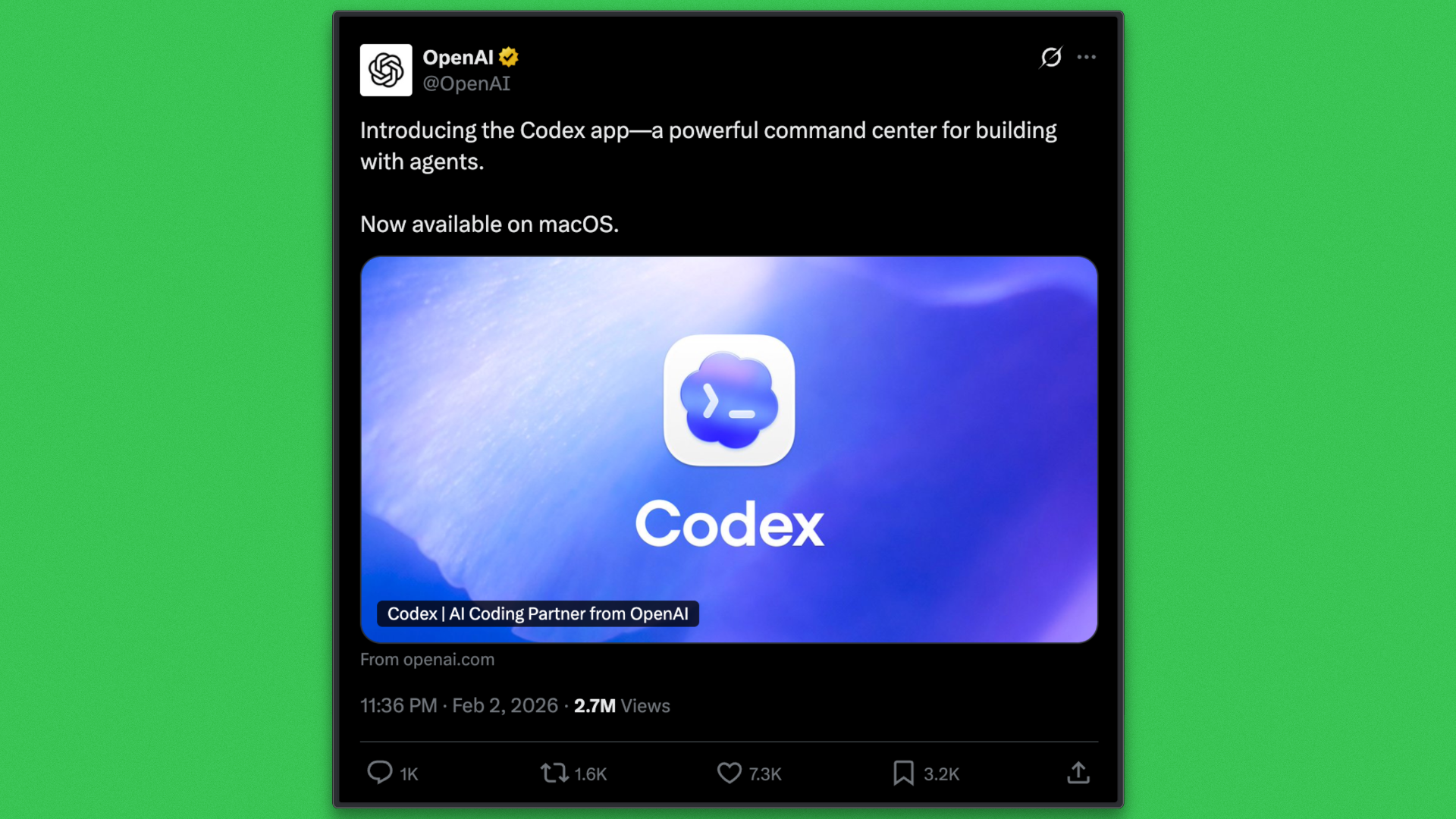
OpenAI has released the Codex App, introducing a development workflow that sits outside the dominant model of AI-powered IDE extensions. The app frames software development as a process in which tasks execute independently and results are surfaced for review, rather than remaining tied to continuous editor interaction.
AI already sits at the center of today’s development practice. According to the Stack Overflow 2025 Developer Survey, 84% of developers use or plan to use AI tools, and 51% of professional developers rely on them daily. This adoption has largely reinforced IDE-centric workflows, where AI improves writing speed and local reasoning while execution stays tightly coupled to human attention.
Codex applies AI at a different layer of the workflow. Work begins with intent, followed by agents analyzing the repository, planning changes, and executing tasks in isolated local or cloud environments. Multiple tasks can proceed concurrently, with human involvement focused on review and decision-making.
This article examines the Codex App from a technical perspective, explains why it is being described as a “Cursor killer,” and explores how agent-oriented execution reshapes modern software development.
Codex App Overview
The Codex App serves as an agent-orchestration platform for software development. It provides a unified surface for defining tasks, executing them via autonomous agents, and reviewing outcomes at the project level. Rather than participating in editing workflows, the app focuses on coordinating execution across repositories.
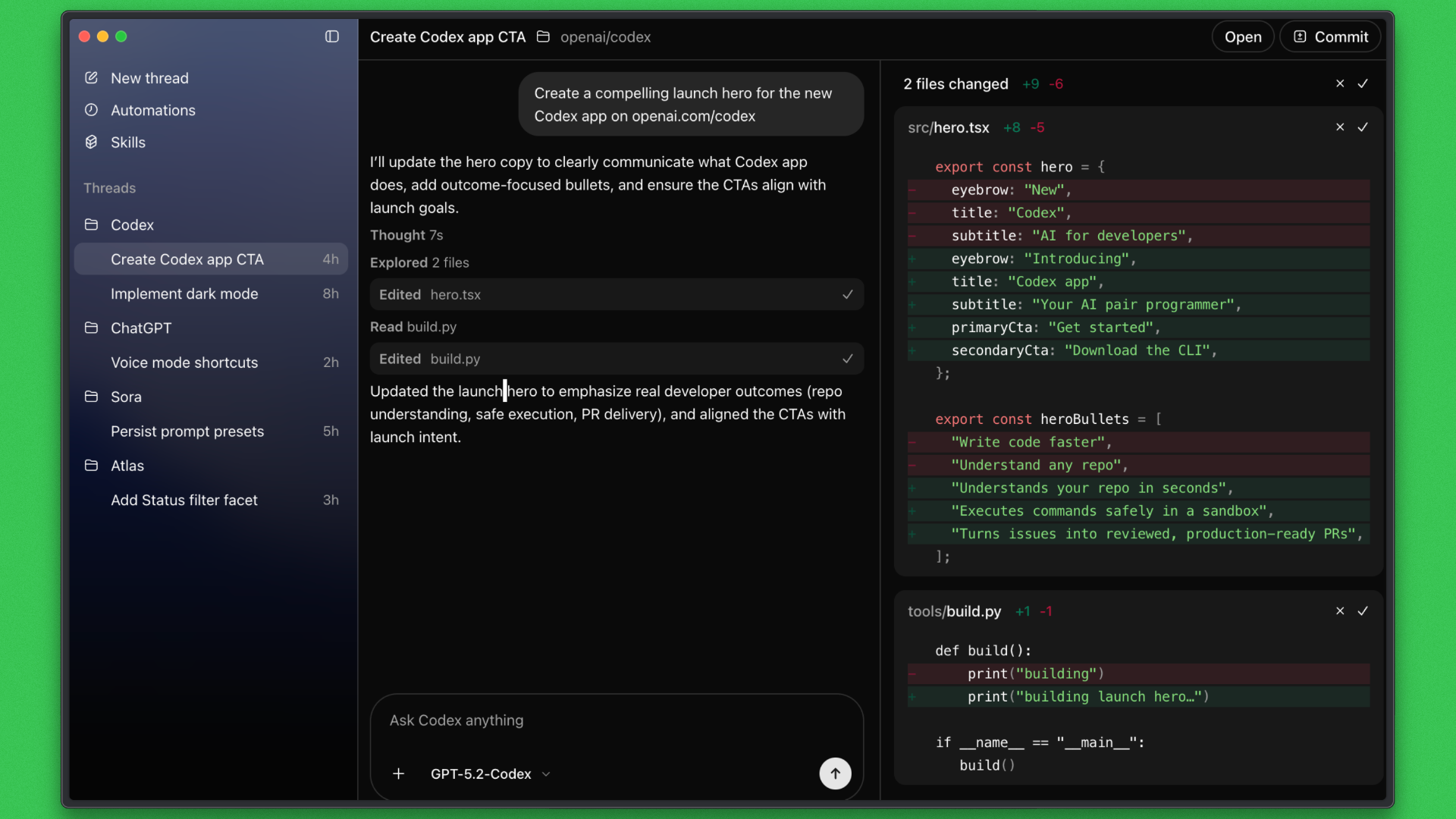
Internally, the Codex App is powered by the same Codex models used by the Codex CLI, specifically the GPT-5 Codex family optimized for large-scale repository analysis, planning, and execution. The app and CLI share execution history and configuration, allowing work to move seamlessly between graphical and command-driven surfaces.
The key difference between the two surfaces lies in control and visibility. The CLI emphasizes direct, command-based execution, while the app provides persistent task tracking, progress inspection, and structured review over time.
Tasks can run in local environments or cloud-backed runtimes, depending on isolation and resource requirements. This allows Codex to support both short interactive work and long-running operations such as refactors, migrations, and dependency upgrades.
Overall, Codex differs from IDE plugins by centering execution rather than editing. It follows an agent-first design, accepts outcome-driven tasks, treats asynchronous execution as fundamental, and centralizes visibility across all active and completed work.
An important aspect of the Codex App is that the same agent operates consistently across surfaces. Work can begin in the Codex App, continue inside an IDE such as VS Code, Cursor, JetBrains IDEs, or Warp, and extend into the terminal through the Codex CLI, all connected through a single ChatGPT account.
The Codex CLI can be installed with:
Codex App Features
The Codex App is designed around execution rather than editing. Its features support task-oriented development, where work is defined once, executed autonomously, and reviewed in a structured way. The emphasis is on coordination, isolation, and visibility across projects rather than optimizing individual edit loops.
- Multitasking across projects: Multiple tasks can run and be monitored across different repositories from a single interface, providing a centralized view of active and completed work.
- Isolated execution modes: Tasks can execute locally, in Git worktrees, or in cloud environments, allowing safe isolation and flexible use of resources.
- Task-level progress visibility: Execution status, logs, and intermediate outputs are surfaced directly, enabling supervision without relying on terminals or external tooling.
- Diff and pull request outputs: Results are presented as structured diffs or pull requests, aligning autonomous execution with standard version control and review workflows.
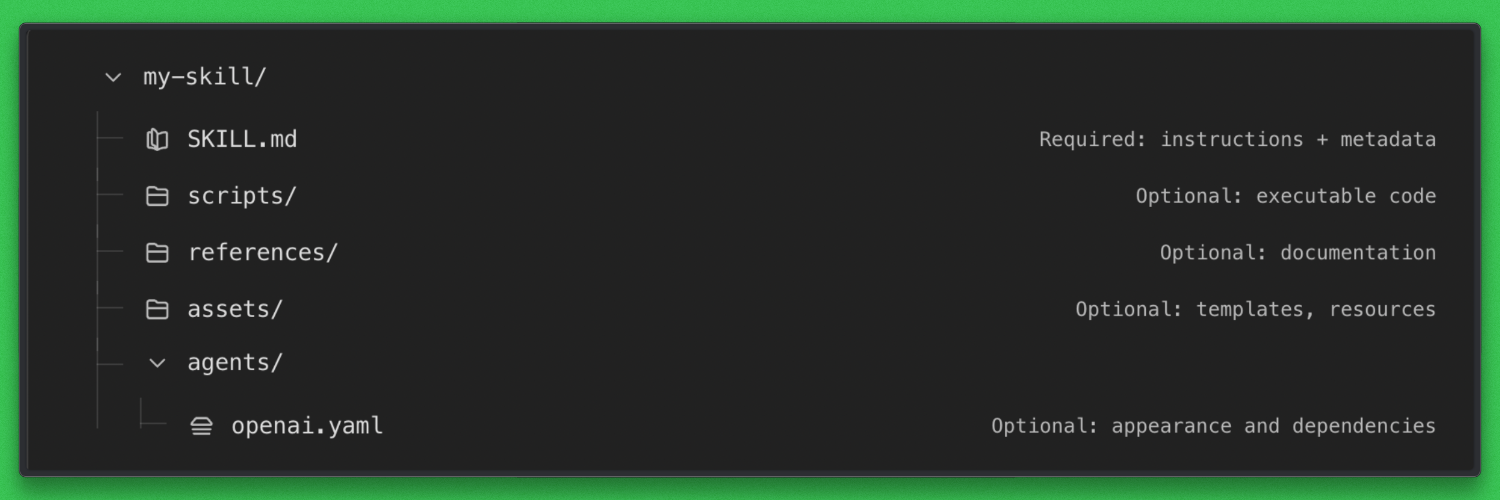
- Skills support: Reusable agent capabilities guide how tasks are executed, helping enforce consistent behavior across repeated workflows.
- Auditability and history: Commands, actions, and outcomes are retained, making autonomous execution inspectable and traceable over time.
Why Developers Are Calling It a “Cursor Killer”
The phrase “Cursor killer” does not come from feature parity or model quality. It reflects a shift in where development progress is driven. Cursor improves productivity inside the IDE. Codex moves progress outside of it.
In Codex, development work is organized around tasks rather than files or cursor position. A developer specifies the intended outcome, and agents handle analysis, planning, execution, and iteration. Editors remain important for inspection and review, but they are no longer the primary mechanism for advancing work.
This change is reinforced by first-class support for Skills and Automations. Skills allow agents to follow defined execution patterns, while automations allow tasks to run repeatedly or continuously without manual triggering. These capabilities operate at the project and system level, not within an interactive editing loop.
What makes this meaningfully different from IDE-centric tools is not any single feature, but the combined effect:
- Progress is driven by task orchestration rather than continuous editing
- Long-running work continues without occupying developer attention
- Multiple agents can operate on the same project in parallel using isolation mechanisms such as worktrees
- Developers focus on specifying outcomes instead of managing step-by-step edits
- Context switching between editors, terminals, CI systems, and dashboards is reduced
- Senior developers gain leverage by scaling decisions across agents and ongoing work
- Execution state, failures, and history are visible in a unified interface
Cursor remains highly effective for interactive coding and rapid feedback. Codex targets a different constraint: execution, coordination, and sustained work at scale.
As development increasingly involves parallel tasks, long-running operations, and continuous automation, Codex absorbs categories of work that previously depended on constant IDE interaction. That structural change is what leads developers to describe it as a “Cursor killer.”
How Codex and Cursor Approach Development Work
Although Codex and Cursor both use large language models to assist with software development, they apply them in fundamentally different ways. Understanding this distinction is necessary before comparing execution on the same task.
How Cursor Works
Cursor operates inside the IDE and augments the editing experience. The developer remains in control of the session, selecting files, navigating the codebase, and deciding the sequence of changes. The model responds to prompts and context provided by the editor, helping generate or modify code inline.
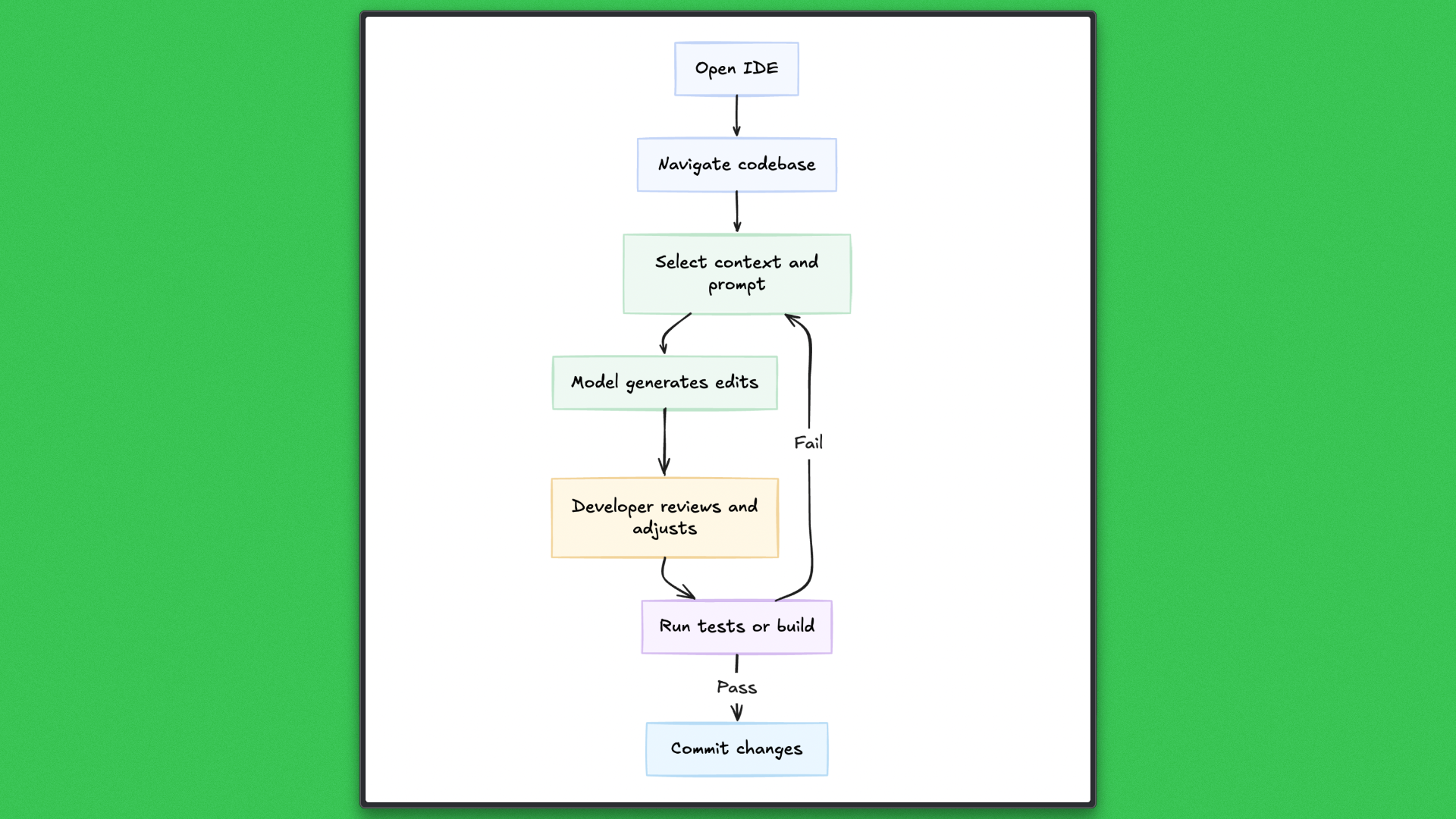
Execution in Cursor is tightly coupled to the editing loop. Changes are applied incrementally; tests are run manually or via editor tooling; and failures are handled as they occur. The tool excels at short feedback cycles and interactive problem solving, but progress depends on continuous developer attention and a single active thread of work.
How Codex Works
Codex operates outside the editor and treats development work as a task to be executed end-to-end. A developer provides an objective, and the agent analyzes the repository, produces an execution plan, and applies changes in an isolated local or cloud environment.
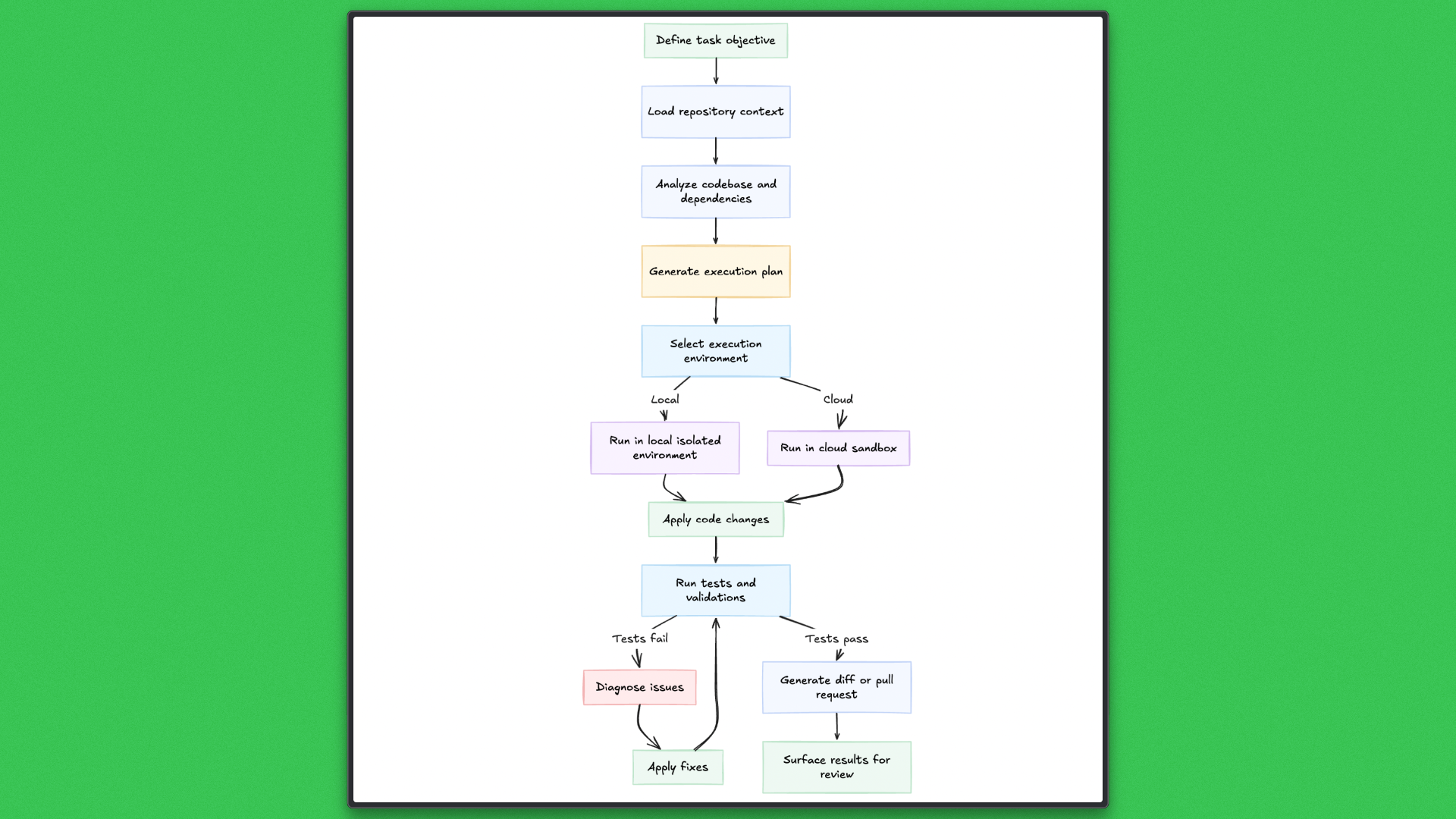
Tasks are designed to run to completion. Codex runs tests, diagnoses failures, and applies follow-up changes within the same task. Multiple tasks can execute concurrently against the same project, each isolated from the others, with results surfaced as structured diffs or pull requests for review. This execution model prioritizes completion and supervision rather than continuous interaction.
Why the Difference Matters
The contrast between Codex and Cursor reflects more than interface preference; it changes where engineering effort is spent. According to data, Cursor has amassed over 1 million users and 360,000 paying customers, generating $100 million in revenue in 2024 — a sign of how widely IDE-centric assistance has been adopted. Despite this success, Cursor still operates inside the editor loop, requiring continuous attention and incremental edits.
Codex’s model is different: work is defined once, executed autonomously, and results are surfaced for review. This matters for tasks that span many files, require long execution time, or need parallel progress. By handling planning, execution, testing, and iteration within a single task, Codex reduces blocks and context switching, making it more effective for large-scale or complex work.
Pricing Comparison
Pricing is closely tied to how each tool expects to be used.
Cursor follows a seat-based subscription model. As of now, pricing is centered around fixed monthly plans per developer, with higher tiers unlocking increased usage limits and background agent capabilities. Cost scales linearly with team size, and model access is abstracted away from the user. Developers interact with whatever model Cursor selects under the hood, with limited control over reasoning depth or execution cost.
Codex pricing is tied to ChatGPT plans and model selection, making compute an explicit part of the workflow. Codex exposes multiple execution tiers, including GPT-5.2-Codex Low, Medium, High, and Extra High, as well as GPT-5.1-Codex-Max and Codex-Mini variants. Developers can trade execution cost for deeper reasoning, longer context windows, or more autonomous behavior on a per-task basis.
This difference matters operationally. Cursor optimizes for predictable per-seat cost. Codex exposes compute as a first-class decision, aligning cost with task complexity, execution time, and autonomy rather than editor usage.
Execution Deep Dive: Local and Worktree Execution
This section evaluates Codex as an execution platform by observing how it handles greenfield website development under different execution modes. The focus is on planning quality, isolation guarantees, parallelism, and task completion, not on code generation alone.
Two execution modes are examined. A single local execution establishes baseline behavior. Parallel execution using Git worktrees then evaluates Codex’s ability to run multiple tasks on the same project without manual coordination.
Execution Mode 1: Local Execution (Baseline Website)
Local execution establishes how Codex plans and delivers a complete website from scratch within a single task.
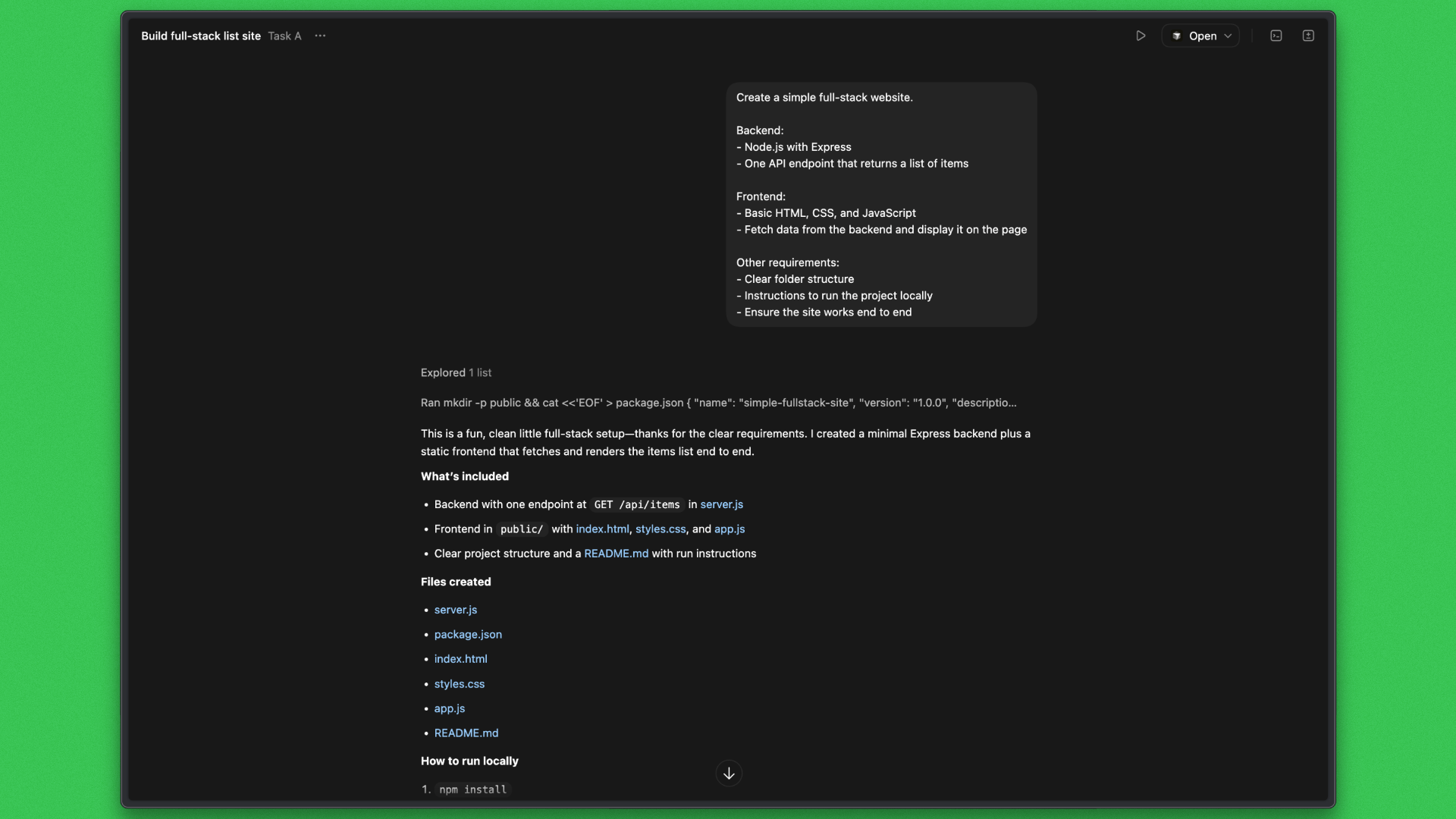
Task
Create a small but complete website, including the backend and frontend.
Prompt
Codex Response:
Outcome:
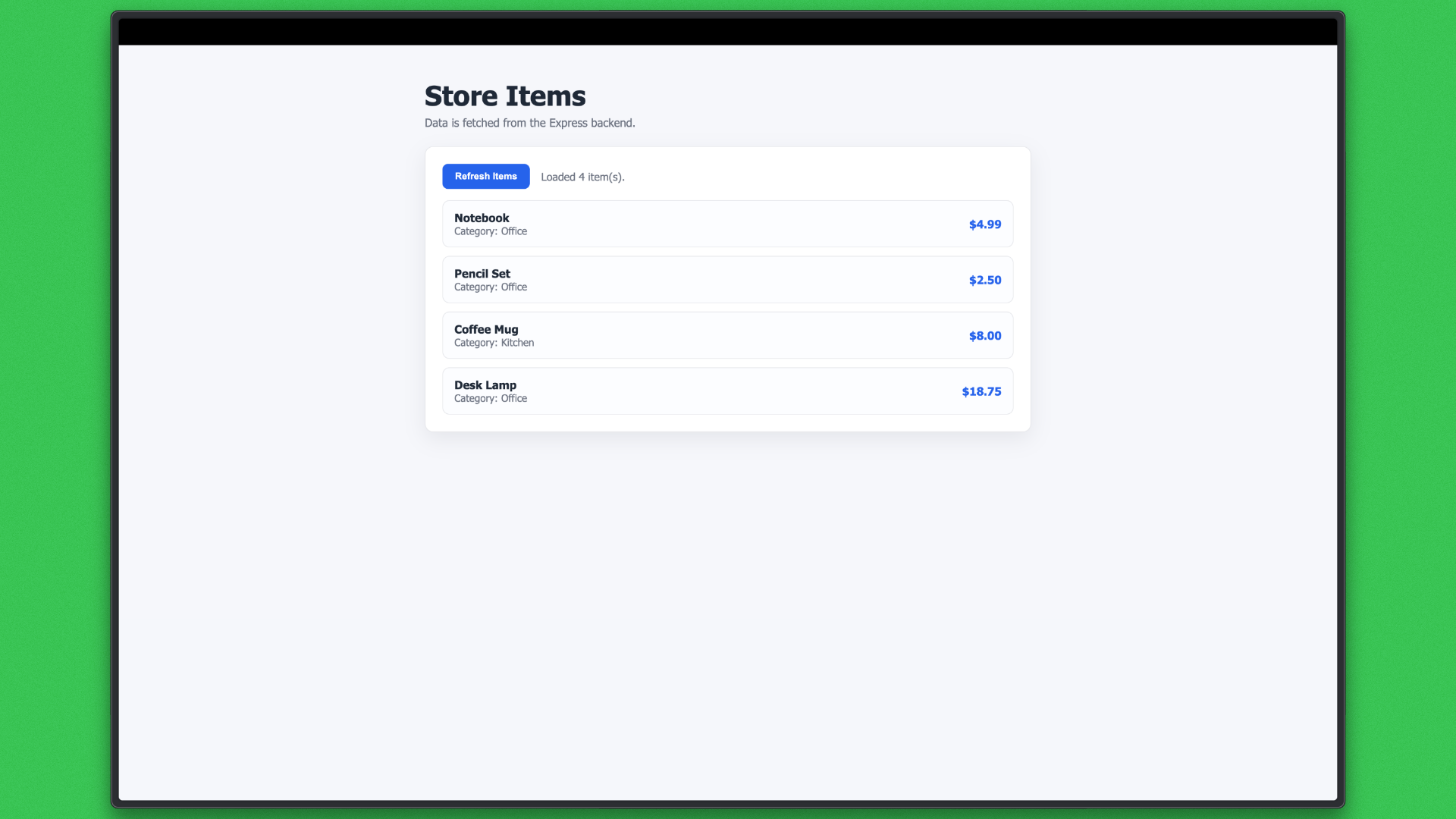
What this establishes
- Project structure decisions
- Dependency setup
- End-to-end execution
- Clarity and completeness of the final output
- Review readiness
This task serves as a baseline for execution quality and delivery.
Execution Mode 2: Worktree Execution (Parallel Website Tasks)
Worktree execution is used to evaluate Codex’s ability to run multiple tasks concurrently on the same website while maintaining isolation. Each task is executed in its own Git worktree, created from the same base branch, allowing changes to proceed in parallel without modifying the primary working directory.
Two tasks are launched close together against the same project.
Task A: Authentication
Task B: Search Feature
Task B was executed in an isolated worktree and completed end-to-end. Codex created a new branch and worktree, synchronized the baseline project, and added a /api/search endpoint, extended the frontend with a search interface, and updated documentation. All changes remained confined to the worktree and did not affect the original working directory.
Codex Response:
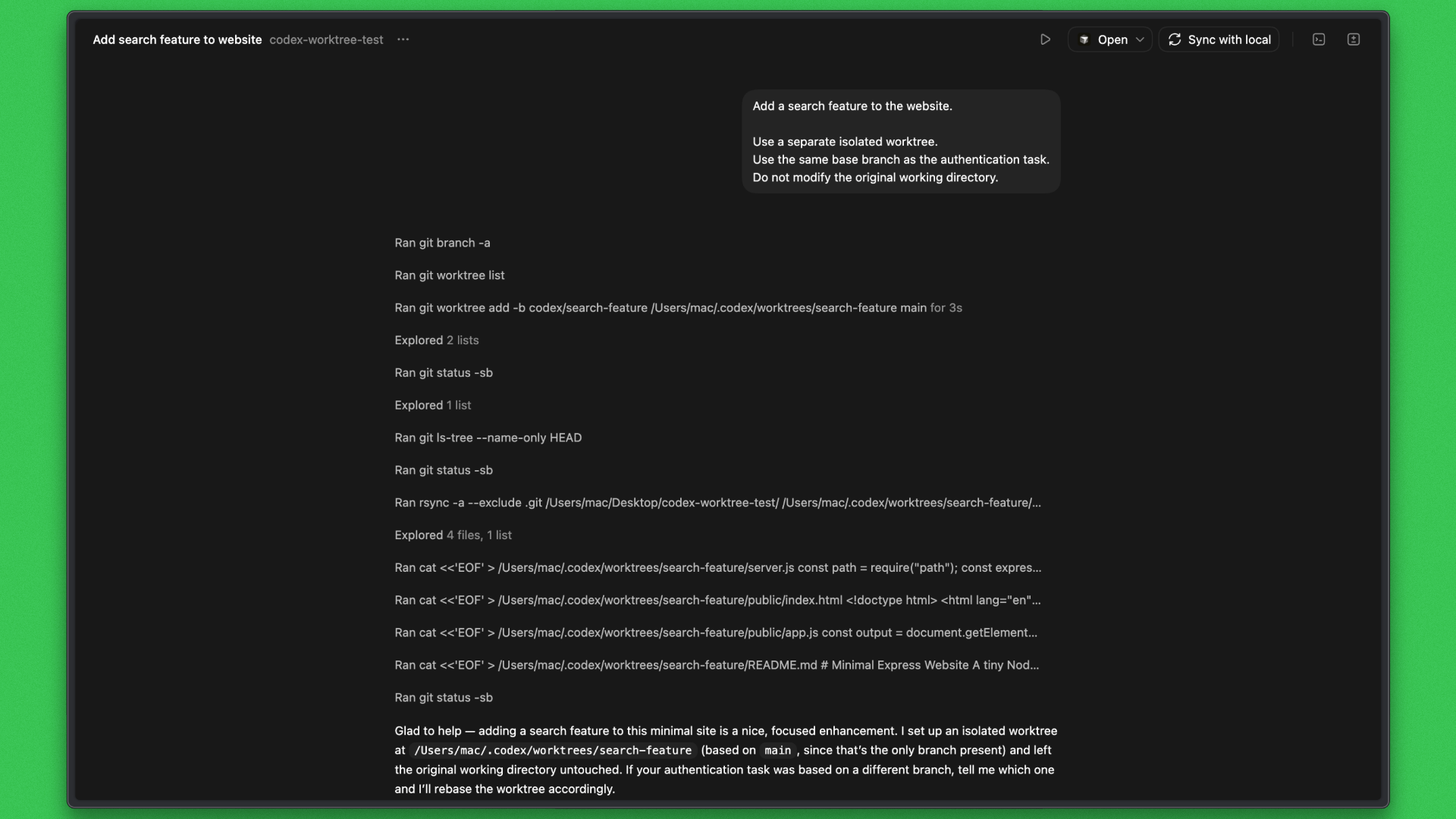
Outcome:
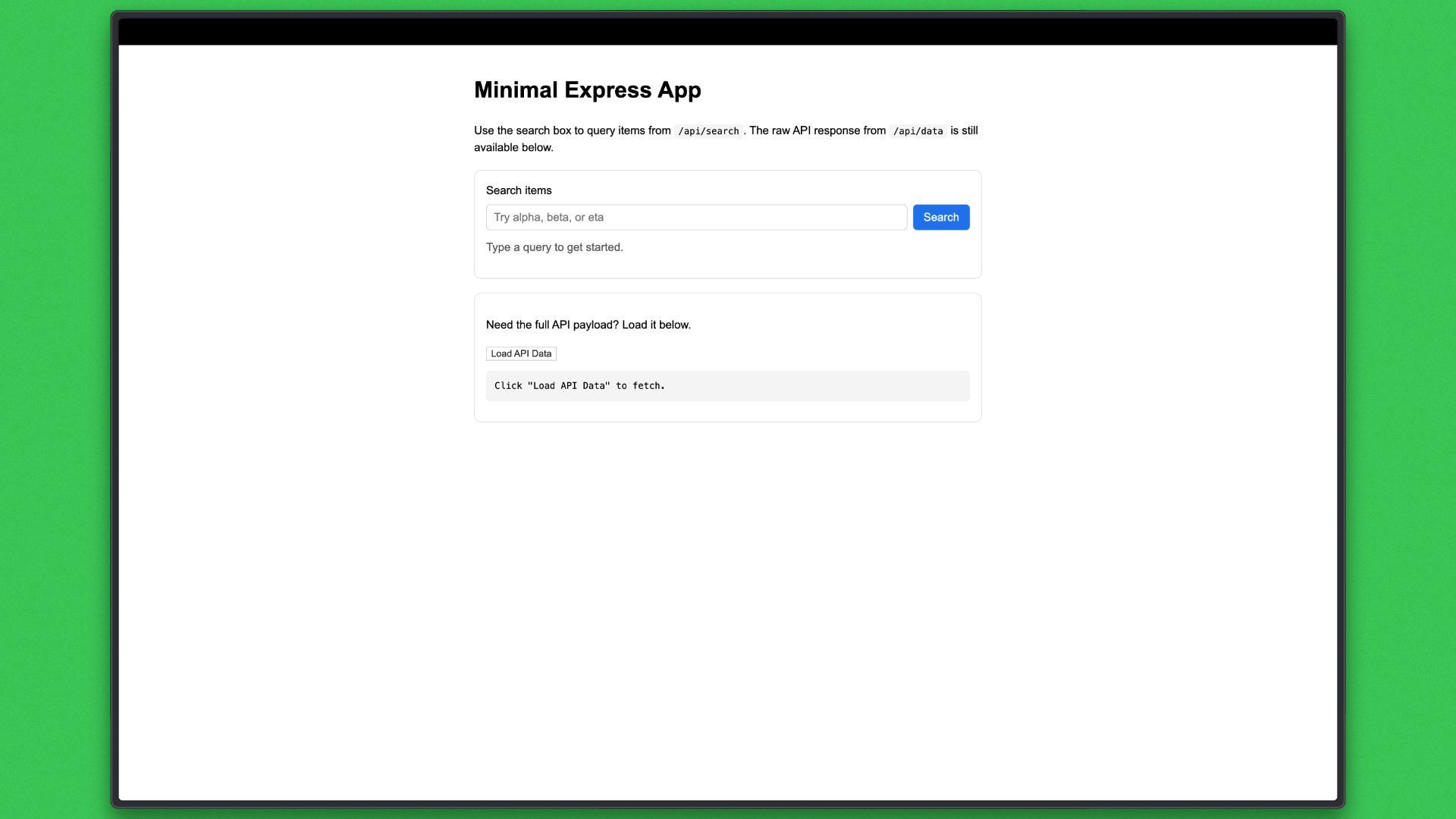
What this evaluates
- Whether worktrees provide effective isolation for parallel tasks
- How Codex plans and executes changes that touch shared backend and frontend code
- The clarity and reviewability of changes produced in parallel
- The impact of concurrent execution on merge complexity and regression risk
This execution demonstrates Codex’s ability to deliver user-visible features in parallel without requiring manual coordination, validating worktrees as a practical mechanism for concurrent development tasks.
Executions Outcome
The two execution modes show how Codex handles both single-task delivery and parallel execution on the same project.
In the first task, Codex delivered a complete end-to-end website in a single execution with a cohesive, reviewable output. In the second, Codex implemented a search feature in an isolated Git worktree, preserving isolation and surfacing clean results for review.
Limitations and Open Problems
While Codex introduces a distinct execution model, several trade-offs matter in practice.
- Agent-driven workflows require repository analysis, planning, and validation before execution begins, which makes Codex slower to start than interactive IDE tools. This overhead is acceptable for long-running work but can feel heavy for small, tightly scoped changes.
- Running tasks in isolated local or cloud environments adds operational complexity. Correct dependency setup, secrets handling, and configuration parity are required, and misconfiguration can surface late in the task lifecycle.
- Cost is less predictable because pricing scales with execution depth and duration rather than with fixed interaction time. Large or parallel workloads require active monitoring to avoid unexpected spend.
- Human steering is coarser-grained. Codex favors review and correction after execution rather than continuous guidance, which works well for well-defined tasks but can be inefficient when requirements are still evolving.
These limitations do not undermine the model, but they define where Codex fits best today and where IDE-centric tools remain more effective.
Conclusion
Codex reframes software development around execution rather than interaction. Treating work as tasks that can be planned, isolated, and completed independently moves progress out of the editor and into supervision and review.The execution study shows this clearly. Codex delivered a complete website in a single task and safely introduced parallel changes using worktrees on the same project. The value came from execution control, isolation, and reviewability, not from faster code generation.
This does not replace IDE-centric tools, which remain better suited for rapid iteration and exploratory work. Codex fits larger, longer-running, and parallel tasks. As a first release, it has rough edges, and future versions will likely address current limitations.
Developers should experiment with Codex now to understand where execution-first workflows can create the most leverage.



Get server-less runtime for agents and data ingestion

Tensorlake is the Agentic Compute Runtime the durable serverless platform that runs Agents at scale.
“With Tensorlake, we've been able to handle complex document parsing and data formats that many other providers don't support natively, at a throughput that significantly improves our application's UX. Beyond the technology, the team's responsiveness stands out, they quickly iterate on our feedback and continuously expand the model's capabilities.”
.png)
"At SIXT, we're building AI-powered experiences for millions of customers while managing the complexity of enterprise-scale data. TensorLake gives us the foundation we need—reliable document ingestion that runs securely in our VPC to power our generative AI initiatives."
.png)
“Tensorlake enabled us to avoid building and operating an in-house OCR pipeline by providing a robust, scalable OCR and document ingestion layer with excellent accuracy and feature coverage. Ongoing improvements to the platform, combined with strong technical support, make it a dependable foundation for our scientific document workflows.”

"For BindHQ customers, the integration with Tensorlake represents a shift from manual data handling to intelligent automation, helping insurance businesses operate with greater precision, and responsiveness across a variety of transactions"

“Tensorlake let us ship faster and stay reliable from day one. Complex stateful AI workloads that used to require serious infra engineering are now just long-running functions. As we scale, that means we can stay lean—building product, not managing infrastructure.”