Overview
Browser Harness is 592 lines of Python. It gives an LLM a direct WebSocket connection to Chrome's DevTools Protocol and an editable workspace to write code into. That's the entire harness.
Thesis: remove abstraction layers
The design philosophy is explained in "The Bitter Lesson of Agent Harnesses". The browser-use team's earlier versions of the library shipped thousands of lines of element extractors, DOM indexers, and click wrappers — every click(), type(), and scroll() helper a decision about what the model needs. They concluded those decisions were the problem. LLMs were trained on millions of tokens of raw CDP (Chrome DevTools Protocol) — Page.navigate, DOM.querySelector, Runtime.evaluate — so wrapping those calls in abstractions forces the model to fight around its own training rather than use it.
The concrete cases where raw CDP is a better strategy over other wrappers: cross-origin iframes (attach to the target directly, no frame abstraction in the way), Shadow DOM (walk shadowRoot.querySelectorAll the way the model has seen thousands of times in training data), and anti-bot detection (it's Chrome talking to itself, so synthetic events don't trigger fingerprinting). The team also removed watchdog services they'd built to catch Chrome crashes — tab crashes, renderer out-of-memory, GPU process failures. With direct CDP access and an editable harness, the agent reads the crash error, reattaches to a fresh target, and retries. It doesn't need a watchdog. It's seen enough Chrome crash threads in training to know what to do.
Repo structure: protected core + editable workspace
The repository splits into two areas with deliberately different access levels. The protected core handles the persistent WebSocket to Chrome — daemon.py at 220 lines, a 13-line entry point, and 192 lines of utility functions. Everything above Chrome lives in agent-workspace/: an agent_helpers.py file the LLM writes into during execution, and a domain-skills/ directory of reusable patterns for specific sites — GitHub, LinkedIn, Amazon. The agent writes into the workspace; the core stays unchanged.
Self-healing loop
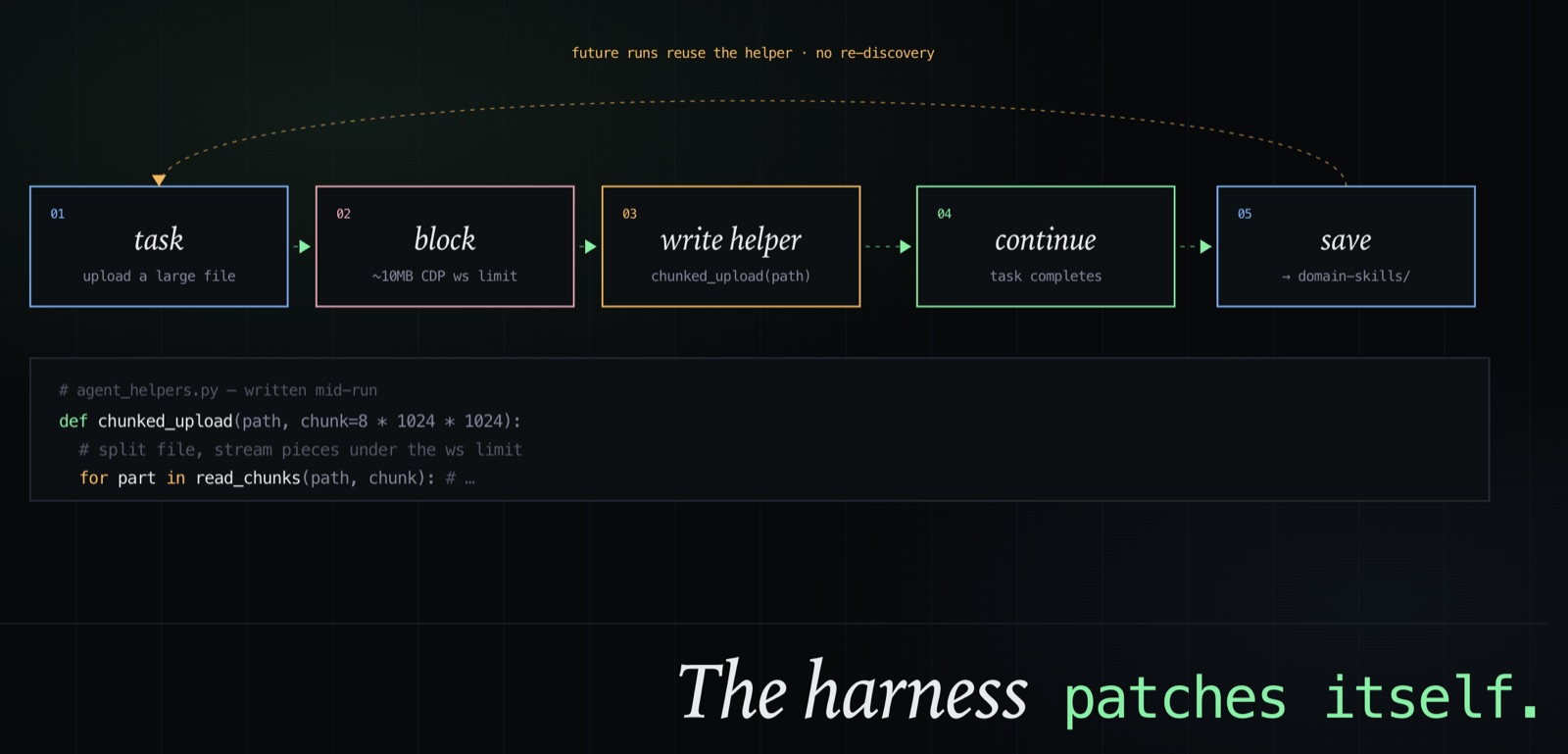
The self-healing mechanism works as follows: the agent encounters something it can't do with the helpers available, writes the missing function into agent_helpers.py, and keeps going.
A concrete example from a real run: the agent was uploading a large file and hit Chrome's CDP WebSocket payload limit of ~10MB. No existing helper handled uploads above that size. The agent wrote a chunked upload function — splitting the file into smaller pieces to stay under the limit — and completed the task. It wasn't instructed to do this; it identified the constraint, wrote the fix, and continued. The solution is also saved under domain-skills/ so future runs don't have to rediscover it.
Why Python execution over fixed tool schemas
The shift from tool-based actions (click, type, scroll) to Python code execution as the primary interface is what the browser-use team credits as the single largest improvement to their benchmark results. Most browser agents give the LLM a fixed tool schema. When a task requires something the schema doesn't cover — a Shadow DOM element, a site that blocks synthetic events, a complex data extraction — the agent fails. With Python execution, those edge cases become a few lines of code the agent writes itself.
Auto-Research loop (20 parallel improvement cycles)
Auto-Research is how the team reached the 97% Online-Mind2Web score. Rather than manually tuning the harness, they gave Claude Code access to their evaluation CLI and let it run 20 improvement cycles per benchmark goal in parallel — each cycle trying a different variation of the agent design, running it against the task set, and measuring the result. The system searched for large design changes: switching from tool-based actions to Python execution, restructuring how the harness handles cross-origin iframes, changing the prompting strategy. Minor parameter tweaks weren't worth testing because run-to-run variance makes small score differences statistically meaningless.
Two pieces of infrastructure made this viable. First, an agentic judge built with the Claude Agent SDK to evaluate whether tasks actually succeeded. Screenshot comparison doesn't work for complex tasks — if the benchmark asks the agent to book a flight with specific dates and the cheapest available seat, a screenshot can't tell you whether the booking went through or just looked like it did. The judge reasons over the full task outcome. Second, a three-level hierarchical CLI for debugging failed runs: rather than replaying a full agent session (which can produce million-token traces), the CLI lets engineers drill from task-level failure down to the specific tool call or model response that broke.
The Browser Harness team reports 97% on Online-Mind2Web internally; the HAL Princeton leaderboard, which scores binary end-to-end task completion on 300 live websites, puts Browser-Use at ~40% — still first on that board, but a different metric.
JavaScript version: typed CDP wrappers
A JavaScript version (browser-harness-js) takes the same approach further: 652 typed CDP method wrappers auto-generated from Chrome's upstream protocol JSON, covering all 56 CDP domains. No editable helper file — the protocol is the API, called directly via session.<Domain>.<method>(params). The JS version has 425 stars against 9,000 for the Python version, likely because the Python version integrates naturally with Claude Code.
Launch + link
Browser Harness launched April 17, 2026 and reached 9,000 stars in two weeks.
The repo is at browser-use/browser-harness.