TL;DR
CLI-capable agents are hard to evaluate because the work is stateful, messy, and many proposed solutions fail while looking like reasonable ones. Harbor gives you a consistent way to define, run, and score real terminal tasks. Tensorlake gives you the sandboxed execution layer to run those tasks safely and reproducibly — a clean MicroVM per run, strong isolation, easy cleanup. Together they're a full evaluation stack for agents that operate in terminal environments. We obtain 0.955 score on the oracle agent on terminal-bench@2.0, which makes it ideal for the evaluation of agents.
Getting started
pip install "harbor[tensorlake]"
export TENSORLAKE_API_KEY="tl_..."
Run a Harbor task using Tensorlake as the environment. you need an Anthropic API key for the following example:
harbor run --env tensorlake \
  --include-task-name pytorch-model-cli \
  --dataset terminal-bench@2.0 \
  --agent claude-code \
  --model anthropic/claude-sonnet-4-6 \
  --ae ANTHROPIC_API_KEY=$ANTHROPIC_API_KEY
How It Works
Anatomy of a Harbor Task
A Harbor task (a "trial") has three pieces:
- Environment: how to build the runtime (often a Dockerfile + required assets)
- Task instructions: what the agent is supposed to accomplish
- Evaluation script: an executable verifier that decides success/failure
Example structure:
gcode-to-text
├── environment
│   ├── Dockerfile
│   └── text.gcode.gz
├── instruction.md
├── solution
│   └── solve.sh
├── task.toml
└── tests
    ├── test_outputs.py
    └── test.sh
Example task: gcode-to-text
The agent must parse raw G-code, track machine state across steps, and produce a human-readable description of the print geometry. It's not a "run this command" toy — it requires reasoning, spatial state tracking, and real tool use.
Running a Harbor task with Tensorlake
Tensorlake provides sandboxed environments to run Harbor tasks safely and reproducibly. Instead of containers, it uses MicroVMs, which typically give you:
- Stronger isolation
- A clean machine per run
- Better security guarantees
How Harbor runs on Tensorlake
To integrate with Harbor, Tensorlake implements the lifecycle of a trial:
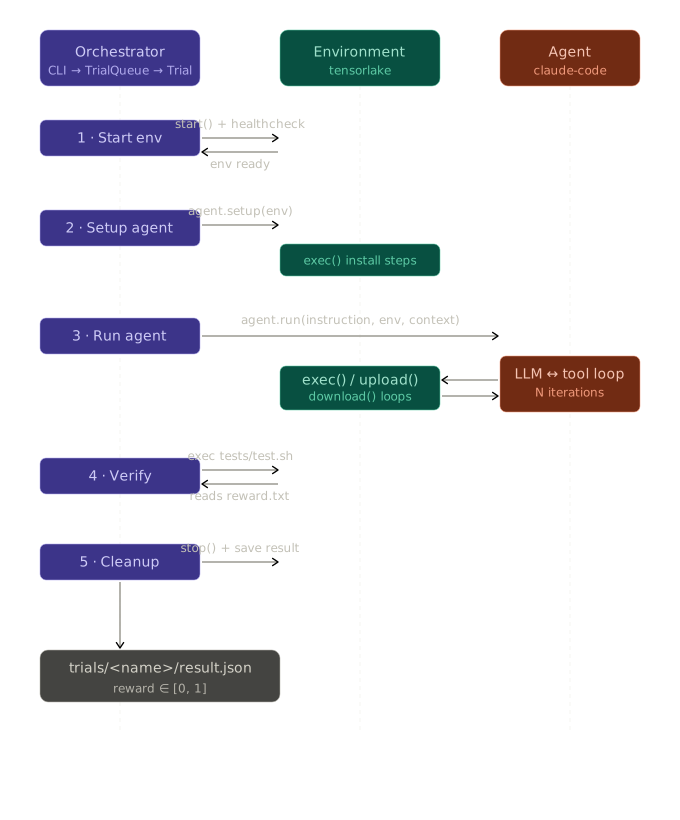
Step 1 — Start environment
A fresh MicroVM is launched. Harbor tasks are Dockerfile-based, so Tensorlake replays the Dockerfile inside the VM — but it can't just run docker build. It has to interpret the instructions directly.
This is the hardest step, which involves the following:
Parsing
def _parse_dockerfile(self, dockerfile_path: str) -> list[dict]:
    # Joins backslash-continued lines, tracks WORKDIR changes,
    # accumulates ARG/ENV into a flat dict, and tags each RUN/COPY
    # with the workdir that was active when it appeared.
    ...
Order matters: a RUN mkdir /app before COPY . /app must execute in that order. The parser preserves this.
Command rewriting
Raw Dockerfile RUN commands often don't work as-is in a plain VM:
def _adapt_run_command(self, cmd: str) -> str:
    # 1. Inject `apt-get update` before bare `apt install` calls
    # 2. Strip OS-specific version pins (e.g. pkg=1.2.3-ubuntu1)
    # 3. Normalize `pip` / `pip3` → `python -m pip`
    # 4. Ubuntu: swap chromium snap stubs for Google Chrome Stable
    # 5. Debian: inject lgets shim into gcc/g++ compile+link commands
    ...
For example, apt install chromium on Ubuntu resolves to a snap stub that doesn't run inside a VM. The rewriter swaps it for google-chrome-stable with a matching chromedriver. These are the kinds of edge cases that make "just replay the Dockerfile" deceptively hard.
Sandbox baseline setup
Before any Dockerfile instructions run, the environment sets a clean baseline:
async def _setup_sandbox_baseline(self, sandbox):
    await sandbox.run("ip link set lo up")               # loopback
    await sandbox.run("pip config set global.break-system-packages true")  # PEP 668
    await sandbox.run("pip install 'setuptools<70'")     # legacy compat
    # installs apt/pip wrapper scripts that strip version pins at runtime
Step 2 — Set up the agent
The agent connects to the sandbox via an execution bridge. From the agent's perspective it has a normal shell; Harbor routes its commands into the MicroVM.
Tensorlake also supports pre-warmed snapshots — a snapshot ID can be passed at environment creation to skip cold setup entirely for tasks with known-expensive environments:
env = TensorLakeEnvironment(
    cpu=2,
    memory=4096,         # MB
    storage=20480,       # MB
    internet_access=True,
    snapshot_id="snap_abc123",  # skip Dockerfile replay, restore from snapshot
)
Step 3 — Run the agent
The agent executes its plan:
- Issues CLI commands
- Reads/writes files
- Iterates based on feedback
Tensorlake handles the "plumbing" that makes this reliable:
- File transfer (
upload_file,download_file)
Step 4 — Verify
Harbor runs the task's test suite inside the sandbox:
tests/test.shThe result is written to:
reward.txt1.0→ success0.0→ failure
This contract prevents "hallucinated success": the agent can claim it solved the task, but the verifier runs independently and doesn't read the agent's output — it checks the filesystem state directly.
Step 5 — Cleanup
The sandbox is destroyed immediately:
client.delete(sandbox_id)With retry logic to avoid zombie environments. Because MicroVMs are fully isolated, cleanup is a hard delete — no shared state to unwind.
Benchmark results
oracle agent on terminal-bench@2.0: 0.955
The oracle agent uses the task's solution/solve.sh directly — it's an upper bound on what a real agent could achieve if it had perfect knowledge. Running it first is useful for validating that an environment is correctly set up before spending time on real agents.
Debugging + observability
Debugging agent behavior in terminal environments can be painful. Harbor + Tensorlake make it less painful by giving you:
Interactive debugging
harbor env attach <session_id>Drop directly into the running sandbox.
Structured logs
Each trial produces structured artifacts, e.g.:
gcode-to-text__UFALMLv
├── agent/
├── verifier/
├── result.json
├── trial.log
So you can trace:
- The agent's actions and outputs
- What the verifier checked
- Why the trial passed or failed
Key takeaways
- Evaluation ≠ execution. Benchmarks are necessary, but without a reliable runtime you won't trust the results.
- CLI tasks are a different regime. They test planning, state tracking, and real-world tool use — not just "answer quality."
- Verification is non-negotiable. A strict evaluator is what turns "agent demos" into measurable performance.
- Oracle agents help a lot. Harbor's oracle agent is useful for validating environments before you burn time evaluating real agents.
Future work
- We are working on supporting OCI images, which will make integration easier.
Conclusion
Evaluating CLI agents requires infrastructure, not just prompts and a scoreboard.
- Harbor provides benchmark format, orchestration, and verification.
- Tensorlake provides reproducible, MicroVM-isolated execution.
Together they make CLI agent evaluation safer, more repeatable, and more honest — and the integration is a single --env tensorlake flag away.
Appendix — Start environment: Dockerfile parsing and execution in detail
1. Parse (_parse_dockerfile)
- Join backslash-continued lines into logical lines
- Extract from the first
FROM: base image and Python version (ifpython:image) - Track
WORKDIRas instructions are encountered, resolving relative paths - Accumulate
ARGdefaults andENVpairs into a single env dict - Append
RUNandCOPY/ADDto an ordered instructions list, each tagged with the workdir active at that point
2. Command rewriting (_adapt_run_command)
Before executing any RUN, rewrite it for the sandbox:
- Prepend
apt-get update+DEBIAN_FRONTEND=noninteractiveto bareapt installcalls - Strip OS-specific version pins (e.g.
pkg=1.2.3-ubuntu1) - Replace
pip/pip3withpython -m pip - On Ubuntu: swap
chromiumsnap stubs for Google Chrome + matching chromedriver - On Debian: inject
lgetsshim into gcc/g++ compile+link commands
3. Execute instructions (in original order)
For each entry in the instructions list:
COPY — local source
- Resolve dest against
copy_workdirif relative .or./→ upload entire build context- Directory source → upload contents (not the dir itself)
- File source → probe sandbox with
test -dto decide exact target path, then upload
COPY --from=<stage>
astral-sh/uvimage → install viapip+ symlink binaries to dest- Any other stage → skip with a warning (requires Docker daemon)
RUN
- Execute rewritten command in its captured
workdir - On
apt installexit code 100: retry each package individually, skipping unavailable ones
4. Fallback (no instructions)
If the Dockerfile has no COPY or RUN at all, upload the entire environment/ directory to workdir (legacy behaviour).