TL PRODUCTS

Sandboxes
for Agents

Stateful Execution Environments
for Agents

Today's infrastructure was built for running web applications. Agents are different, they run longer, call more tools, and need stateful environments to store context and memory. Tensorlake Sandboxes are stateful VMs with sub-second startup and restore, live migration across machines, and auto suspend-and-resume. Your agents keep working no matter what.

Spins up in milliseconds, restores in under a second
Live migration: sandboxes move to healthy machines automatically, no work lost
Auto suspend after inactivity, serverless boot on first request
2x faster filesystem than Vercel, 5x faster than E2B
Scale to 100s of sandboxes per second, millions concurrently
Key features
Isolated execution

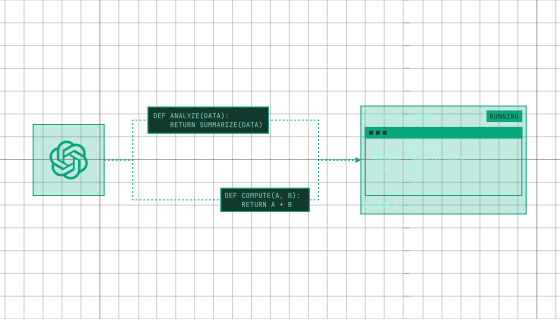
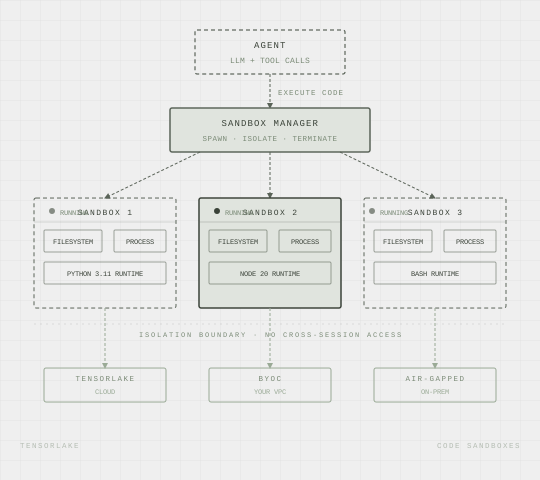
Every agent session runs in its own sandbox with a full filesystem. LLM-generated code can't touch your infrastructure or leak data to other sessions.

Instant scale

Spin up 100 sandboxes per second with no cold starts. Handles bursty agent workloads without queuing, throttling, or manual provisioning.

Serverless BOOT

Sandboxes boot up instantly when applications running inside them are called

BREAKDOWN
Full filesystem per session

Each sandbox gets its own isolated filesystem. Agents can read, write, and execute files freely without any risk of cross-session contamination.

Persistent Memory and File Systems

Snapshot file system and memory of sandboxes to be able to clone them across the cluster or resume them from the point they were suspended

Sandbox as a Tool

HOW IT WORKS
breakdown
1.
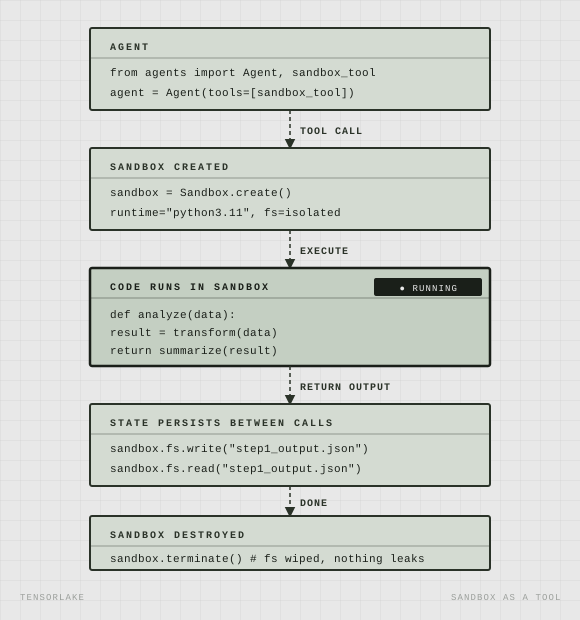
Write your Agent in any Framework

LangChain, PydanticAI, OpenAI Agents SDK, or fully custom

2.
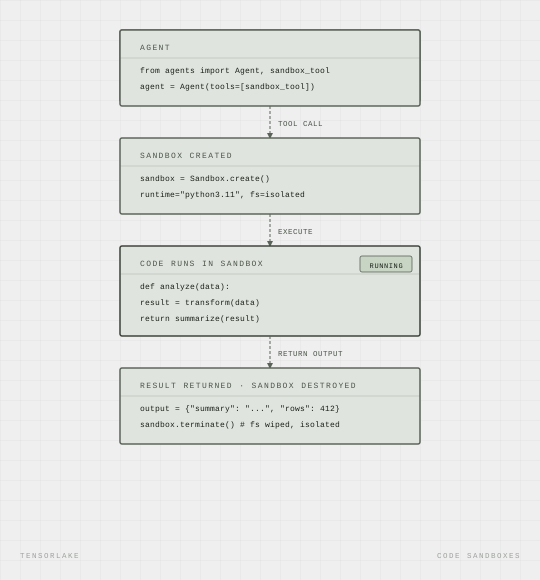
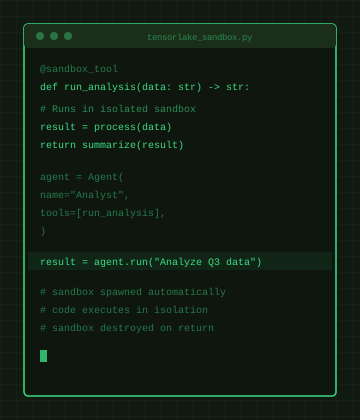
Expose a Sandbox as a Tool

The agent calls it whenever it needs to run code or read and write files

3.
Agent Generates and Executes Code

Writes code to solve the problem, runs it inside the sandbox

4.
State Persists Between Calls

The filesystem stays alive across tool calls so the agent can build on previous steps

5.
Sandbox Destroyed on Completion

Output returned, filesystem wiped, nothing leaks

visual 1.1
tensorlake
Never lose progress
visual 1.1
tensorlake
Never lose progress
visual 1.1
tensorlake
Never lose progress
visual 1.1
tensorlake
Never lose progress
visual 1.1
tensorlake
Never lose progress

Agents Inside a Sandbox

HOW IT WORKS
breakdown
1.
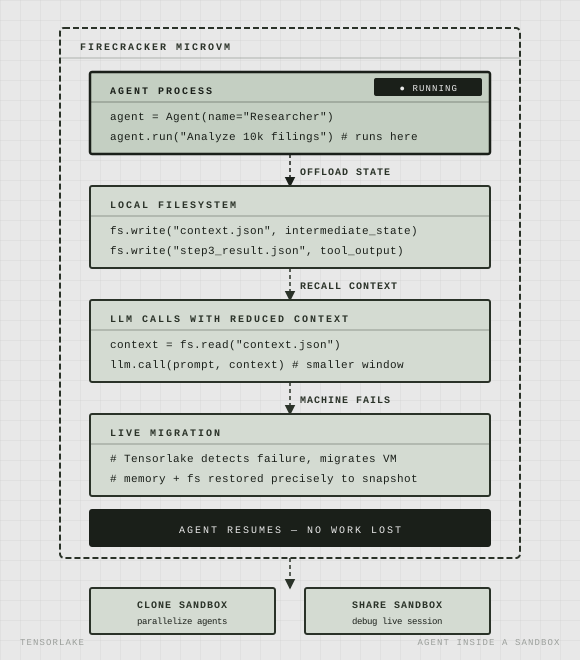
Agent Process Starts Inside a Firecracker MicroVM

Start an agent harness as an application inside a sandbox

2.
Local filesystem as Working Memory

Agent writes intermediate results and context to disk, freeing up the context window for harder problems

3.
Survives Failures Automatically

Tensorlake live-migrates the sandbox if the machine fails, agent resumes exactly where it left off

4.
Clone or Share Live Sandboxes

Duplicate a running sandbox to parallelize work, or share with a teammate to debug a live session

5.
Auto Suspend and Serverless Boot

Tensorlake freezes the sandbox when your agent is inactive and brings it back up when it receives a request

visual 1.1
tensorlake
Never lose progress
visual 1.1
tensorlake
Never lose progress
visual 1.1
tensorlake
Never lose progress
visual 1.1
tensorlake
Never lose progress
visual 1.1
tensorlake
Never lose progress

Do more with Code Sandboxes

REAL VM ISOLATION

Each sandbox runs in a Firecracker microVM. LLM-generated code can't touch your host.

APPLICATION ENDPOINTS

Expose applications in sandboxes as stable HTTP endpoints.

Serverless boot

Sandboxes boot up immediately when Application Endpoints are hit

CLONE SANDBOXES

Clone a running sandbox in real time to 100s of other instances

VERSION SANDBOXES

Take point in time snapshots to restore sandboxes to a specific point in time.

RUNs ANYWHERE

Run sandboxes in your VPC or in Tensoralke Cloud

What agents can build with sandboxes:
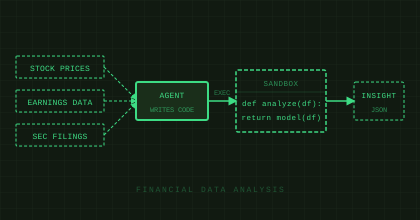
FINANCIAL DATA ANALYSIS

Agent pulls live data, writes and runs analysis code in a sandbox, returns structured insights.
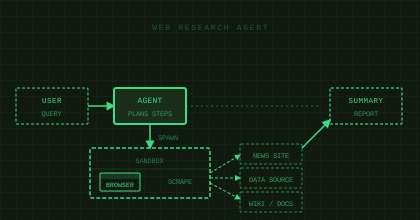
WEB RESEARCH AGENT

Agent spawns a headless browser, navigates to sources, scrapes and summarizes, all sandboxed.
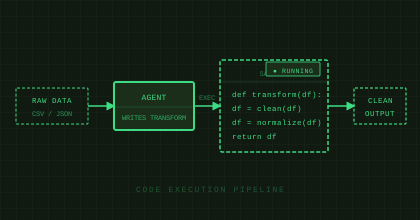
CODE EXECUTION PIPELINE

Agent writes transformation code, executes it against a dataset, returns clean output. No infra needed.