Devin is Cognition's AI software engineer: you give it a task, and it handles everything, planning, coding, testing, and creating pull requests. All of that work in Cognition's cloud. Devin Outposts expands on this by allowing the execution to happen in your own environment, while the agent loop remains in Devin’s cloud.
We published a reference implementation for using Devin Outposts with Tensorlake sandboxes, devin-outposts-tensorlake, that you can clone, configure, and run today.
Why use Outposts
Outposts are ideal when your source code and working environment need to remain on infrastructure you own. Instead of performing repository access, file edits, and commands on a Cognition-hosted worker, Outposts ensure that all activity happens securely inside your Tensorlake sandbox.
Common use cases include:
-
Custom environments: When the agent needs a custom environment: private CA certificates, preinstalled toolchains, pre-cloned repositories, or services only reachable from your network. You define all of that in the Tensorlake image and sandbox configuration, and every session boots into it.
-
Local access needs: When Devin needs to reach your internal systems. Tensorlake can run on self-hosted compute, so the sandboxes can sit inside your network. From there Devin can read your source code, query your databases and storage, and test against the systems it's actually writing code for, instead of working blind from the outside.
-
Seamless session lifecycle with Tensorlake sandboxes: Devin sessions and Tensorlake sandboxes are closely aligned. When a Devin session sleeps, the corresponding sandbox suspends, preserving all memory, filesystem, and running processes without consuming compute resources. When resumed, the session picks up exactly where it left off, maximizing efficiency and minimizing cost. More details on this below
How it works
Devin's cloud is the control plane, and your sandbox is the execution plane. Two pieces connect them: the Outpost on Devin's side, and the orchestrator on Tensorlake's side.
A Devin Outpost is a named queue that you register with Devin. Once registered, it shows up in Devin's UI next to the standard Ubuntu and Windows environments. When you start a Devin session and choose your Outpost, Devin adds that session to the Outpost queue. The orchestrator is a continuously running process from our integration package. It maintains an outbound connection to Devin, so it can pick up a session, create a Tensorlake sandbox and launch devin-remote, the Devin's session binary, inside it. devin-remote connects back to Devin and executes the commands generated by the Devin agent. The orchestrator does not do any of the agent's work.
The orchestrator’s main job is managing the session lifecycle: it returns sessions to the queue when they sleep or end, and ensures each session’s sandbox is in the correct state, created, resumed, suspended, or terminated. It’s the only service you need to operate, and since it runs inside a Tensorlake sandbox, there’s nothing left running on your own machine.
Devin's cloud is the control plane; your Tensorlake sandbox is the execution plane. The orchestrator, itself in a long-lived Tensorlake sandbox, is the only service you run.
One sandbox maps to one session, never shared, and moves through a simple lifecycle:
| Trigger | Sandbox action | Compute state |
|---|---|---|
| Session picked up | create from image, or resume a suspended one | Boot or in-place restore |
| Active | Serving commands | Full compute |
| Devin puts the session to sleep | suspend: preserve memory, disk, and running processes | No running compute |
| Session wakes | resume the same sandbox | In-place restore |
| Session terminated | terminate | Sandbox removed |
The suspend and resume features really matter, because a Devin session isn't active most of the time when it's open. When your session goes to sleep, its sandbox saves all your memory, files, and running processes, without using any compute resources or running up your bill. When you wake the session, everything picks up right where you left off: your repo stays cloned, caches are warm, and devin-remote resumes as well. If you’ve ever saved progress during a long training run, it’s the same concept. You get a dedicated VM for each session, but you’re not paying for the downtime when nothing’s happening.
Each Outpost needs its own orchestrator. Each session on an Outpost runs in parallel in an isolated sandbox. You can configure how many sessions can run concurrently and the resources allocated to each sandbox.
How to set up
You need a Devin account with Outposts enabled, plus a Tensorlake account. The sandboxes are Linux microVMs, so the Outpost is Linux only. Then clone this repo to install:
git clone https://github.com/tensorlakeai/devin-outposts-tensorlake
cd devin-outposts-tensorlake
python3 -m venv .venv && . .venv/bin/activate
pip install -e .
cp .env.example .env   # add your TENSORLAKE_API_KEY here
The one interactive step is connecting the Outpost to your Devin org:
outposts-connect --platform linuxRun this command on the machine where your browser is located. It walks you through Devin's partner connection flow, similar to signing into an app with your Google account. A Devin org admin clicks Connect to approve the Outpost, and the command exchanges a one-time code for the real credential in the background. It then writes all necessary orchestrator details to .env. The token itself never passes through the browser; For a detailed explanation, see the the docs.
The Outpost now exists. It shows up in Devin's session composer, right next to Cognition's own Ubuntu and Windows options:
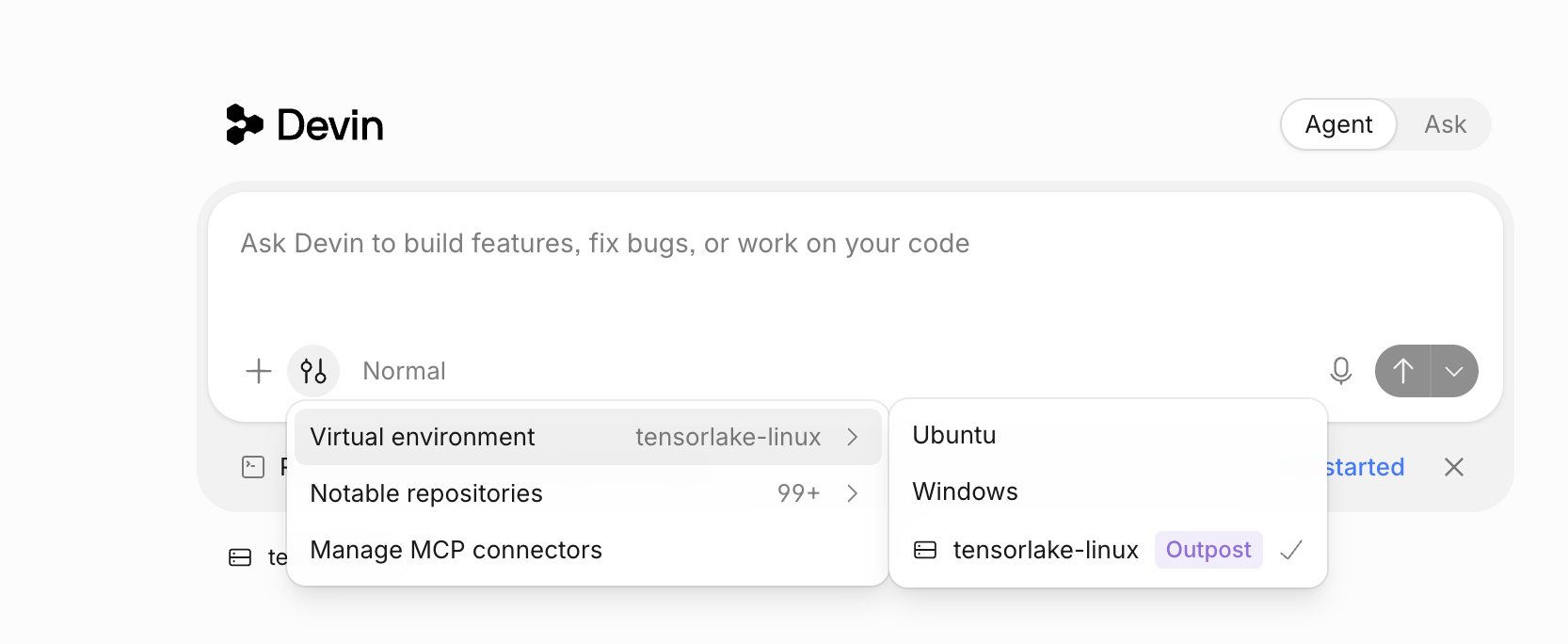
Devin's virtual environment selector with the tensorlake-linux outpost selected.
The Outpost is registered, but nothing is serving it yet. Build the two sandbox images:
build-devin-outposts-image              # build the image for the sandboxes that run sessions
build-devin-outposts-dispatcher-image   # build the image for the sandbox that runs the orchestrator
The first build prints the name of the image it produced. Copy that into IMAGE_NAME in .env, then start the orchestrator:
devin-outposts-orchestrator-sandbox # start the orchestrator in its sandboxOnce the orchestrator is up, pick the Outpost when you start a session, and the session's commands, file edits, and repository access happen in a Tensorlake sandbox.
Check on the orchestrator any time with devin-outposts-orchestrator-sandbox --status or --logs, and tear it down with --terminate. The command is idempotent, so rerunning it revives the orchestrator if it ever stops.
Clone the repo to start
- Reference implementation repository with the orchestrator and the CLI commands that drive it.
- Devin Outposts on Tensorlake docs for the full setup and the config reference.
- Sign up for Tensorlake to grab an API key and connect your first outpost.