Every Terminal-Bench task ships a reference solution called the oracle that's known to be correct. When you run harbor run --agent oracle, you're not testing a model — you're checking that the environment itself built and booted the way it should.
The oracle pass rate has to be 1.0. Since the solution is already correct, any task it fails is a broken environment, not a wrong answer — a score below 1.0 is measuring your harness, not the agent.
Harbor, the underlying framework, builds its environments from Docker images. Cloud sandbox infrastructure is generally built on microVMs or gVisor, so those Docker images get translated to VM or gVisor images and that translation often produces incorrect or buggy environments. If anything about the environment is off — a missing apt package, the wrong Python version, a COPY that didn't land, a service that never started — the oracle fails. And once you switch to a real agent run, you can't tell that kind of failure apart from a mistake the agent actually made.
In the last few weeks we've improved the infrastructure that converts Docker images to VM images. We now import an OCI image and faithfully convert it to an ext4 filesystem, preserving the filesystem metadata the OCI image carries. Runtime metadata — environment variables, users, working directory — is recorded too, so that when a sandbox boots it behaves exactly like a Docker container. In our tests we beat Modal and Daytona on oracle accuracy, and we complete the full suite fastest, thanks to improvements in our sandbox orchestration engine and a faster runtime.
01 · Results: Tensorlake vs. Modal vs. Daytona
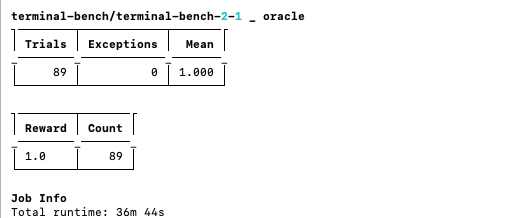
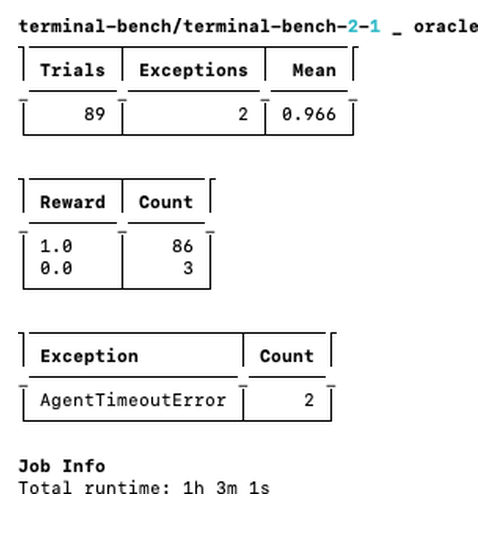
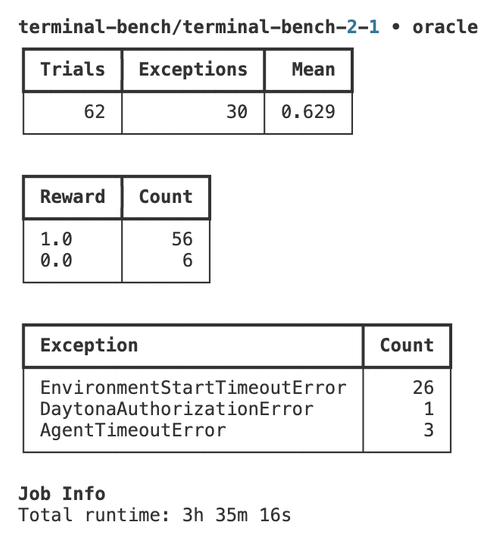
These are oracle runs: the solution is known-correct, so every non-pass is the harness failing, not the agent.
— Why oracle pass rate is the only honest baselineHere's how the three providers compare on Terminal-Bench 2.1 (all 89 tasks). We ran every provider from the same Tensorlake sandbox with identical setup — same Harbor version, same client environment — so the only thing that changed between runs was the sandbox provider itself.
| Provider | Oracle pass rate | Wall-clock · 89 tasks |
|---|---|---|
| Tensorlake | 1.000 · all 89 tasks | ~37 min · 36m 44s latest |
| Modal | ~0.966 · 86 / 89 | ~1 h · 1h 3m |
| Daytona | < 0.70 · 56 / 89 | 3 h+ · 3h 35m |
Modal loses 3 of 89 environments (about 3%) and takes roughly an hour. Daytona drops more than 30%, well below anything usable, and takes over three hours. The exception breakdowns show where: Modal's losses surface as timeouts; on Daytona, 26 of the 30 failures are EnvironmentStartTimeoutError — the sandbox never even started.
02 · Closing the gap: full Docker-image support
We closed that gap with a new TensorLakeEnvironment provider in Harbor. It resolves a task's environment through two high-fidelity paths:
Prebuilt docker_image — preferred
When task.toml declares a docker_image, we import the registry layers into a microVM rootfs once and boot straight from it. The exact published image — no rebuild, no replay.
Build from the task Dockerfile
With no prebuilt image, we build the Dockerfile into a sandbox image once, under a content-hashed name so identical Dockerfiles dedup across runs and hosts.
Modal and Daytona run the real image too, and still didn't hit 1.0. The other half is reliability — bringing every environment up, fast and without timing out. When the transport hiccups mid-run, we retry and reap orphaned sandboxes so a flaky connection doesn't cost you a task.
And we've already done the work for you. We've imported, converted, and registered every Docker image for the full benchmark, so anyone with Tensorlake access can use them directly without building or importing anything. There's still a legacy replay path that boots from minimal and replays the build steps with compat shims, but it's only a fallback if a build fails — not part of the normal flow.
03 · Speed: boot in seconds, not minutes
Because we've already imported, converted, and registered every image, there's no per-run build, import, or pull step. Environments boot in seconds. That pays off most on the expensive tasks:
custom-memory-heap-crashcompiles GCC's libstdc++ twice from source — minutes.qemu-alpine-ssh,qemu-startup, andinstall-windows-3.11pull large ISO/VM images and lean on heavy apt installs.mteb-leaderboard,mteb-retrieve, andhf-model-inferenceneed full Torch + transformers stacks.crack-7z-hashandmake-mips-interpreterbuild C from source and cross-toolchains.
With pre-published images, each of these turns from a multi-minute build into a seconds-long boot. It's a real cold start, not a warm-up: the snapshot-backed image already carries the full environment, so there's nothing to replay per trial.
The other providers don't give you this for free. e2b and Daytona build your image into their own format before they can launch a sandbox — e2b a template per task (89 of them), Daytona a sandbox image or snapshot. Modal pulls the registry image directly, but that pull-and-cache still happens per workspace on the first run. On Tensorlake the images are already there.
Tensorlake finishes all 89 tasks in under 40 minutes — about 1.7× faster than Modal, our closest competitor, with a perfect oracle pass rate on top.
— terminal-bench 2.1 · latest run 36m 44s04 · Try it yourself
One command to reproduce. On Tensorlake it lands at 1.0.
# reproduce the oracle run on Tensorlake → 1.0
harbor run --env tensorlake --dataset terminal-bench/terminal-bench-2-1 --agent oracle- Harbor docs — how to run Harbor on Tensorlake sandboxes.
- Terminal-Bench 2.1 repo — the benchmark and its 89 tasks.
- Sign up for Tensorlake — get access and boot the pre-published images directly.