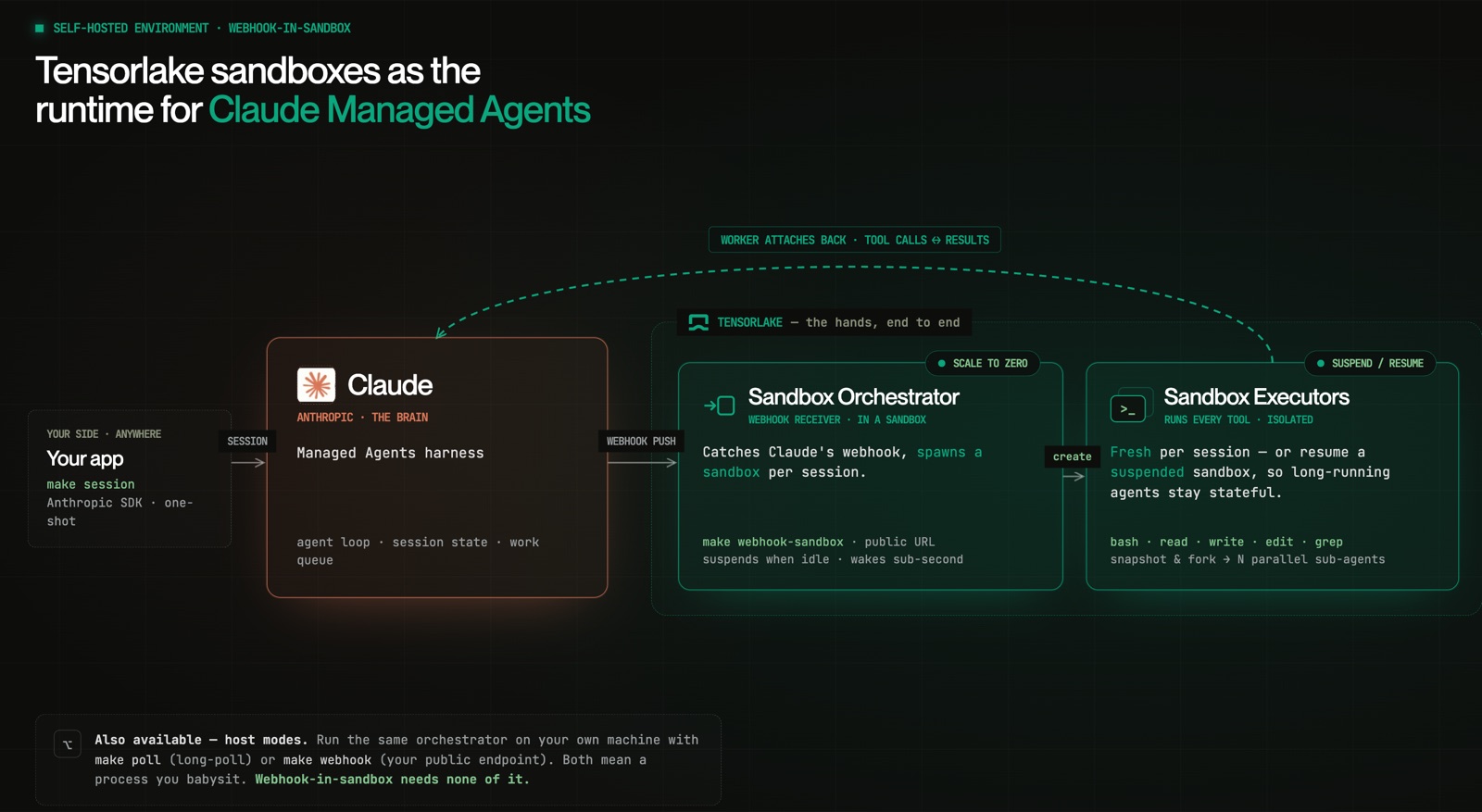
00 · The split: brain and hands
When Anthropic shipped Claude Managed Agents, they split an agent cleanly in two. On one side: the LLM, the agent loop, the session state, the work queue — all managed for you on Anthropic's infrastructure. On the other side: the actual execution of every tool the agent calls — bash, read, write, edit, grep. That half can run in an Anthropic-managed cloud sandbox, or in a self-hosted environment you control.
Self-hosting is the interesting choice: your code, your network policy, your data boundary, your execution primitives. The catch has always been the word self. Historically it meant you run a server — a long-lived process that drains Anthropic's work queue and spawns an environment for every session. Always on. Always billed. Mostly idle.
This post is about keeping everything good about self-hosting — the control — while dropping the always-on tax. We built the integration on Tensorlake Sandboxes, and the short version is: the server goes away.
Claude is the brain; the sandbox is the hands. Claude runs the model and decides which tool to call — it never executes one. Your orchestrator turns each session into a Tensorlake sandbox running a thin worker that attaches back to Anthropic and executes that session's tool calls for as long as the session lives.
The split is the whole idea. A self-hosted Claude Environment doesn't run tools — it places a work item on a queue. Your orchestrator consumes that queue and turns each session into a sandbox. So "self-hosted" really means you own the hands. The flow, end to end:
Your app ──events──▶ Anthropic (agent loop, session state, work queue)
                          │  work item per session run
                          ▼
                     Orchestrator ──create──▶ Tensorlake sandbox
                                                   │ worker attaches back,
                                                   ▼ executes tool calls
                                                Anthropic harness
01 · What owning the hands gets you
A self-hosted environment is only worth the trouble if the thing you're hosting on does something a managed cloud sandbox doesn't. Tensorlake sandboxes lead with a few primitives that matter for agent work specifically.
- 1Isolation per session. Every session gets its own sandbox — its own filesystem, process tree, and network policy. One session's tool calls can't see another's.
- 2Stateful execution. Not a run-a-command-and-die container.
/workspace, installed dependencies, and warm caches persist for the life of the session — so an agent that cloned a repo and installed its deps in turn one still has them in turn ten. - 3Snapshots and fork-from-snapshot.
sandbox.checkpoint()captures a known-good state;Sandbox.create(snapshot_id=…)boots a fresh sandbox from it. Run that N times and you have N children exploring in parallel — the basis for best-of-N tool execution and parallel sub-agents. - 4Suspend / resume. A sandbox suspends when it goes idle — memory and running processes frozen to a snapshot — and resumes with that state intact, in well under a second. Nothing runs and nothing is billed while it's suspended.
That last one is what removes the always-on tax. The server you used to babysit existed to be ready — to catch the next work item the instant it arrived. With suspend/resume, "ready" no longer means "running." The sandbox sleeps when there's no work and wakes on the next request with its state exactly as it left it.
"Ready" stops meaning "running." The sandbox sleeps when there's no work and wakes on the next request — state intact, nothing billed in between.
— The whole point of suspend / resume02 · Where the orchestrator runs — three modes
The orchestrator's job is identical in all three modes: get-or-create a sandbox per session, drain the queue. The only architectural choice is where it runs.
| Mode | Where it runs | Infra you run | Latency |
|---|---|---|---|
| Polling | Your machine / server | A long-running host process | Seconds |
| Webhook | Your machine / server | A public HTTPS endpoint + TLS | ~Instant |
| Webhook-in-sandbox | Inside a Tensorlake sandbox | Nothing — wakes on request | Sub-second |
The first two are the familiar self-hosting story: you run a box. They're great for local dev and for cases where you already operate infrastructure. But the third mode is where "self-hosted without a server" becomes literal — the webhook receiver itself runs inside a sandbox that suspends to zero when no webhook is arriving and wakes on the next one.
Run exactly one orchestrator per environment.
03 · Running a session
The quickstart above builds the per-session sandbox image, creates a Claude Agent and a Self-hosted Environment, then runs the orchestrator with no server of your own — inside a sandbox that prints a public URL you register as a webhook. From there you drive a session from anywhere:
# Drive a session from anywhere
make session PROMPT="create hello.txt with 'hi' then read it back"

# stream:  running · thinking · → write · → read · · done
Success looks like a stream of running / thinking / tool calls (→ write, → read) ending in · done — Claude deciding, the sandbox executing. Prefer a host process for local dev? make poll runs the same orchestrator on your machine.
04 · Where it goes next
Two things build directly on this foundation, each worth its own post.
- 1Scale to zero. Move the orchestrator into a sandbox and the last always-on process disappears — push-latency dispatch with nothing running and nothing billed while idle. That's the webhook-in-sandbox deep dive.
- 2Parallelism for free. Once tool execution lives in a Tensorlake sandbox,
checkpoint()+Sandbox.create(snapshot_id=…)forks one known-good state into N futures — an agent generates N candidate fixes, each races in its own sandbox, the winner is kept. There's a runnable starting point inexamples/parallel-sub-agents.
The full reference integration — the sandbox image, the in-sandbox worker, and one orchestrator runnable in all three modes — lives in examples/managed-agent.